
Sparkle TV: Frequently Asked Questions
Straight answers about devices, sources, the Plus upgrade, the guide, recordings and the problems people actually run into.
Getting started
What is Sparkle TV Player?
Sparkle is a DVR/PVR player for Android-based television devices. It takes a source you already have — an IPTV subscription, a Plex or Jellyfin server, an HDHomeRun tuner, a Tvheadend or Enigma2 box — and turns it into a fast, remote-friendly TV interface with a programme guide, recording and timeshift.
Does Sparkle include channels or movies?
No. Sparkle ships with nothing to watch. It is a player: all channels, movies and series come from the source you connect. The developer states plainly that the app does not provide, host or sell content, and that it has no affiliation with content providers.
Do I need an IPTV subscription to use it?
No. An IPTV login is the most common setup, but Sparkle also reads from Plex, Jellyfin, HDHomeRun, Tvheadend, Enigma2, DVBViewer, DVBLink, Stalker Portal and TVMosaic. If you run a home media server or have an antenna tuner, you can use Sparkle without any IPTV provider.
Which devices does it run on?
Android TV, Google TV and Fire TV devices, plus Android phones and tablets. It is an Android application built around a television layout: DVR, timeshift and multiview are designed for a TV and a remote, not for a phone screen. Windows, macOS, iOS and smart-TV app stores are not supported.
Where do I download it?
From the download page: the APK suits Fire TV and devices without Play Store access, while Android TV and Google TV can install it from the Google Play listing. Both routes install the same app.
Is the app free?
Yes, the player is free with a solid feature set: sources, guide, subtitles, multiple audio tracks, auto frame rate, themes and search. Plus is a paid upgrade that adds recording, timeshift, VOD, favourites, multiview, several simultaneous sources and parental controls.
Sparkle Plus and pricing
What exactly does Plus add?
DVR (schedule and watch recordings), timeshift (pause, seek and resume live TV), VOD (catch-up, movies and series), several sources active at once, favourites, sorting and hiding of channels and categories, multiview, and parental controls for protecting settings.
How much does Plus cost?
As published by the developer: $1.49 per month, $7.99 per year, or $20.99 as a one-time purchase. The yearly option works out to roughly $0.67 a month. Prices can change — check the official product page before buying. Full comparison on the download page.
Do I need Plus to watch live TV?
No. Live playback, the guide, subtitles, audio tracks and search work without Plus. Plus is about recording, pausing, VOD, multiview and organising very large channel lists.
Does the subscription cover channels?
No. Plus is a licence for player features. Channel content is always between you and your provider; the two payments are unrelated.
How many devices can use one Plus purchase?
Your Plus status is tied to your account, and the companion app Sparkle Assistant exists to manage those settings from a phone. Installation on several devices is technically possible, but your provider’s simultaneous-connection limit is usually the real constraint.
Installing on your device
How do I install it on Fire TV Stick?
Install Downloader from the Amazon Appstore, allow unknown apps for Downloader in Fire TV settings, paste the APK link from the download page, then install. Sideloading is the only route on Fire OS; there is no Amazon Appstore listing for the player.
Is it on the Play Store?
The player is listed on Google Play as Sparkle TV Player. Availability can differ by region and by device compatibility, so the APK stays the reliable fallback. Sparkle Assistant is a separate companion app for managing Plus on a phone.
Why does my TV say the app is not compatible?
Play Store compatibility is decided by the device profile, not by the app’s features. On unsupported or unusual TV boxes the APK route works where the store listing refuses. Install it from a file manager and allow unknown sources for that installer.
Will my settings survive an update?
Installing a newer build over the old one keeps sources, favourites and recordings. Avoid uninstalling first — removing the app also removes its local data, which means re-adding every source.
Can I use it on a phone?
You can install and play on Android phones and tablets, but the interface and the Plus features assume a TV. For managing a Plus account on mobile, use Sparkle Assistant instead.
Sources and formats
Xtream Codes or M3U: which should I choose?
Use Xtream Codes whenever your provider gives you a server, username and password: live TV, VOD, catch-up and the guide all come from one login. Use M3U when that is all you received, and add the XMLTV URL separately so the guide fills in.
Which source types are supported?
Xtream Codes API, M3U/M3U8 playlists with XMLTV, Plex, Jellyfin, HDHomeRun (gen 4+, including Storage Engine), Tvheadend 4.2+ and Tvheadend HTSP (API 24+), Enigma2 receivers (VU+, Dreambox), DVBViewer (Recording Service or Media Server), DVBLink 6.x+, Stalker Portal and TVMosaic.
Can I add more than one source?
Yes — using several sources at the same time is a Plus feature. With Basic you keep one active source, which is enough for most single-provider setups.
Where do I find my Xtream Codes details?
Your provider sends them: a server URL with a port (for example http://server:8080), a username and a password. If you only got one long link, that is an M3U URL — use the playlist option instead.
My M3U link works in a browser but not in the app.
The browser may be following a redirect that the app does not. Check for a shortened link, an expired token, or a URL that only works from a specific network. Also make sure the link ends in .m3u or .m3u8 and has no trailing space.
Can I use a local Plex or Jellyfin server?
Yes. Enter the local address of the server and its credentials. The TV and the server must be on the same network, and the server must allow remote or LAN connections for the account you use.
Guide, playback and subtitles
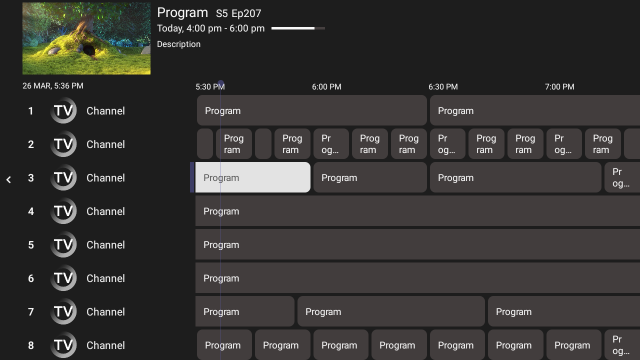
Why is the programme guide empty?
With Xtream Codes it should fill automatically; if it does not, refresh the guide. With an M3U source you must supply the XMLTV URL, otherwise there is nothing to display. A large guide can take a minute on first import.
Programmes are listed two hours off.
Time zone mismatch between the guide data and the device. Correct the TV’s time zone first; if the offset remains constant, the provider’s XMLTV file is using a different zone and that has to be fixed on their side.
Do channel logos show up?
When the source provides them. Sparkle also shows programme images in the guide where the provider includes them. If your provider ships no logos, you get channel names only — nothing the player can invent.
How do I get subtitles or another audio language?
Open the player controls during playback and pick the track you want. Sparkle supports CC, DVB subtitles and teletext, plus multiple audio tracks, so international channels with several languages work without extra plugins.
What is auto frame rate and should I enable it?
It matches your TV’s refresh rate to the stream’s frame rate. Enable it: European channels at 25/50 fps stop juddering on a display running at 60 Hz, and films play at their intended cadence.
Can I search across everything?
Yes — channels, programmes, movies and series. It is the fastest way through a playlist with thousands of entries, and it works with a remote keyboard or the on-screen one.
DVR, timeshift and multiview
Where are recordings stored?
On storage the app can write to — internal storage to start with, a USB drive for anything serious. Choose the location before scheduling, because moving existing recordings later is not automatic.
Why did a scheduled recording fail?
Three usual reasons: the drive filled up, the device slept or lost network, or the provider blocks recording on that channel. Check free space first, then test a manual recording on a public channel to separate device problems from provider limits.
Does timeshift work on every channel?
It needs free storage and a stream the provider allows to be buffered. Some providers or channels disable it. If pause does nothing on one channel but works on another, the cause is upstream.
How many streams can multiview show?
It depends on the device’s decoding power, your bandwidth and your provider’s simultaneous-connection limit. Four tiles is a realistic starting point; each tile is a full stream, not a thumbnail.
Can I lock settings with a PIN?
Yes, parental controls are part of Plus and protect the app’s settings — useful on a shared TV where you do not want the source list or account edited by accident.
Troubleshooting
“Login failed” or “invalid credentials”.
Check the server URL format first — protocol, port, no trailing slash — then confirm the account is active with your provider. A single-connection subscription also refuses a second simultaneous stream, which surfaces as a login error on the second device.
Everything buffers at once.
If every channel stutters, the problem is the network or the provider, not the player. Try Ethernet or the 5 GHz band, pause other downloads, then test the same account on another device. One channel failing while the rest are smooth is a provider-side stream issue.
The picture stutters but the audio is fine.
Usually refresh-rate mismatch. Enable auto frame rate. If it persists on 4K only, the device is decoding at its limit — drop to a lower-quality stream for that channel.
Remote buttons do the wrong thing.
Use remote customisation in the settings to remap them. Cheap third-party remotes often send unexpected key codes, and remapping is quicker than fighting the remote.
Does Sparkle send my credentials anywhere?
The player talks directly to the source you configure. There is no content service in the middle — your provider handles authentication. See the privacy policy for what this site itself collects.
Is using an IPTV player legal?
The player is legal software. Legality of the content depends entirely on your source: use providers that hold the rights, or your own antenna, Plex or Jellyfin library. The developer explicitly does not support streaming copyrighted material without permission. See the disclaimer.
Still stuck?
The setup guide walks through every screen with screenshots. If that does not solve it, send us your device, app version and what you see.
Related guides
- Sparkle TV buffering fix — twelve fixes grouped by cause
- Channels not loading — empty lists, dead streams and DNS
- EPG not working — guide data, IDs and time zones
- Sparkle TV alternatives — seven players compared honestly