
Download Sparkle TV Player
A DVR/PVR player for Android TV, Google TV and Fire TV that streams, records and organises the channels your provider already gives you.
Android TV · Google TV · Fire TV Stick · Android phones and tablets
What Sparkle actually is
Sparkle is a player, not a content service. It does not ship with channels, movies or a playlist. You connect it to the source you already have — an IPTV subscription, a Plex or Jellyfin library, an HDHomeRun tuner, a Tvheadend or Enigma2 box — and Sparkle turns that source into a fast, remote-friendly interface built for a television.
That distinction matters when you install it: nothing works until you add at least one source. If you are brand new, read the setup guide first — it takes about five minutes and saves a lot of guessing.
Built for the big screen
Everything is navigable with a direction pad: guide, categories, playback controls and settings. No mouse, no tiny buttons.
DVR and timeshift
Schedule recordings, pause and seek live TV, and watch programmes after they aired — with the Plus upgrade.
Many sources, one app
Xtream Codes, M3U + XMLTV, Plex, Jellyfin, HDHomeRun, TVHeadend, Enigma2, Stalker Portal and more.
A first look at the interface
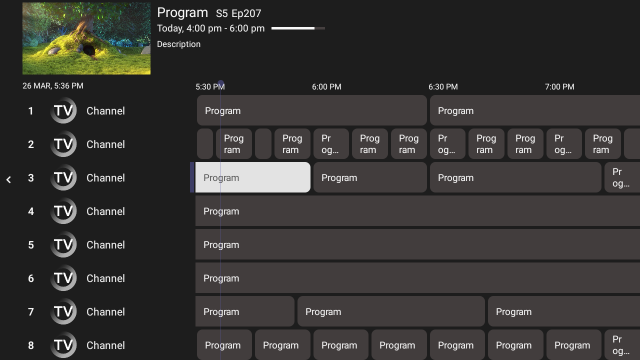
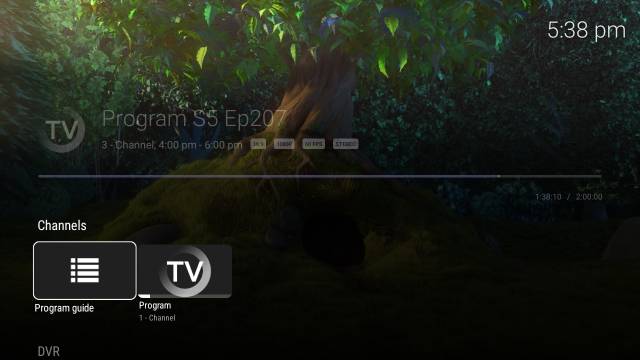
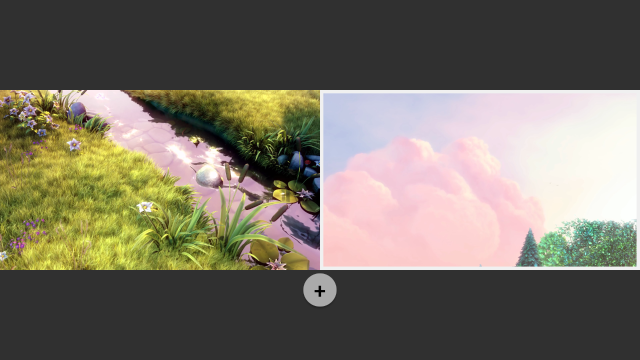
These are real screens from the app: the programme guide, live playback and multiview.
Install on Android TV, Google TV and Fire TV
Sparkle runs on Android-based television devices. Unknown sources must be allowed for the APK route; the Google Play route avoids that entirely.
Android TV & Google TV
- Open the Play Store on the TV and search for Sparkle TV Player, or install the APK below.
- Launch Sparkle and choose Add source.
- Enter your Xtream Codes details or an M3U + XMLTV pair, then let the guide import.
Fire TV & Fire TV Stick
- Install Downloader from the Amazon Appstore.
- In Fire TV settings, allow apps from unknown sources for Downloader.
- Paste the APK link below into Downloader and install the file it downloads.
Phone & tablet
The player is designed for TV screens, so most of its value appears on a television. On a phone you can still install the APK, add a source and play streams, but DVR, timeshift and multiview are built around a TV layout.
To manage a Sparkle Plus subscription on mobile, use the companion app Sparkle Assistant.
Not on Windows, macOS, iOS or a smart TV app store. Sparkle is an Android application for television devices. On a computer you can still use a browser-based IPTV player, but it is a different product and not covered by this guide.
Free vs Plus: what you unlock
The player itself is free. Plus adds the features that turn it into a full DVR: recording, timeshift, VOD catalogues, multiple simultaneous sources, favourites, multiview and parental controls.
| Feature | Basic | Plus |
|---|---|---|
| Xtream Codes, M3U/M3U8 + XMLTV sources | ✓ | ✓ |
| Programme guide (EPG), channel logos, programme images | ✓ | ✓ |
| Multiple audio tracks, subtitles (CC / DVB / teletext) | ✓ | ✓ |
| Auto frame rate, themes, sleep timer, remote customisation | ✓ | ✓ |
| Search across channels, programmes, movies and series | ✓ | ✓ |
| Favourites, sorting and hiding channels or categories | — | ✓ |
| Timeshift — pause, seek and resume live TV | — | ✓ |
| DVR — schedule and watch recordings | — | ✓ |
| VOD — catch-up, movies and series | — | ✓ |
| Several sources active at the same time | — | ✓ |
| Multiview — watch multiple streams at once | — | ✓ |
| Parental controls to protect settings | — | ✓ |
Plus pricing
Monthly
$1.49
per month, cancel whenever you want
Yearly — best value
$7.99
per year — about $0.67 a month
One-time
$20.99
pay once, keep Plus on your account
Prices are the ones published on sparkleplayer.com at the time of writing and can change. Always confirm on the official product page before purchasing.
Sources Sparkle can connect to
The wide source support is what separates Sparkle from single-provider players. If you already run a home server, you probably do not need an IPTV subscription at all.
- Xtream Codes API — the usual IPTV login (server, username, password)
- Playlist — M3U / M3U8 with an optional XMLTV guide URL
- Plex — your own library and live TV
- Jellyfin — open-source media server
- HDHomeRun — gen 4 and newer, including Storage Engine
- Stalker Portal — middleware portals
- Tvheadend — 4.2 and newer, plus HTSP (API 24+)
- Enigma2 — VU+, Dreambox and similar receivers
- DVBViewer — Recording Service or Media Server
- DVBLink — 6.x and newer
- TVMosaic
- Over-the-air antenna via HDHomeRun, Plex or Jellyfin
Setup differs per source type. The setup guide covers Xtream Codes and M3U in detail and explains what to enter for the server-based options.
Three install problems, and the fix
| What you see | What it means, and what to do |
|---|---|
| “Your device isn’t compatible with this version” | The Play Store profile for that box does not match. Install the APK instead and allow unknown sources for your file manager. |
| “For your security, your device is not allowed to install unknown apps” | This is a per-app permission, not a global one. Allow it for the exact app that opens the file — Downloader on Fire TV, a file manager on Android TV. |
| Downloader downloads a file but cannot open it | The download was cut short or the link was copied with extra characters. Re-copy the full APK link and try again on a stable connection. |
| The app installs and closes immediately | Usually a device running an old Android base, or a leftover partial install. Uninstall, reboot the device, install again. |
Updating without losing your setup
Install the new build over the old one. Sources, favourites, scheduled recordings and playback preferences survive an in-place update. Uninstalling first wipes the app’s local data, and you will be re-entering credentials with a TV remote — avoidable pain.
- On Android TV and Google TV, updates arrive through the Play Store when the listing is available in your region.
- On Fire TV and on sideloaded installs, download the newest APK and install it over the existing app.
- Keep an eye on the official community for release notes before a big jump — behaviour of new versions changes faster than any guide can follow.
What hardware is worth it
Sparkle is light. The device is usually the bottleneck long before the app is. Three practical notes, in order of how much difference they make:
Memory beats specs
2 GB of RAM is the practical floor once you use multiview or record while watching. Cheap 1 GB sticks are where “the app is slow” complaints come from.
Network, not magic
If the TV can use Ethernet, use it. Wi-Fi on a stick behind a wall is the single most common cause of “buffering on every channel”.
Storage for DVR
An hour of HD recording is roughly 1–3 GB. If you plan to record weekly, add a USB drive — internal TV storage fills faster than people expect.
Before you install: the honest checklist
- A source of your own — an IPTV account, a Plex/Jellyfin server, or an antenna tuner. Sparkle supplies none of these.
- An Android TV, Google TV or Fire TV device with enough free storage for the app and, if you record, for recordings.
- For DVR: storage the app can write to, and a source that allows recording. Some providers block it on their side.
- A stable connection — roughly 8 Mbps for HD and 20 Mbps or more for 4K per stream.
- Your provider’s current login details or playlist URL. Expired credentials are the number-one cause of “empty catalogue”.
Installed? Finish in two steps
Add your source with the step-by-step guide, then check the FAQ if the guide or the channel list stays empty.
Legal and safety note
Sparkle does not provide, host, sell or bundle any channels, sources or media. All content is supplied by the individual user through their own source, and Sparkle has no affiliation with content providers. Streaming copyrighted material without permission from the rights holder is not supported. By installing the app you accept these terms. See also our disclaimer and privacy policy.
Related guides
- How to install Sparkle TV on Firestick — sideload the official APK in five minutes
- Sparkle TV compatible devices — Android TV, Google TV and Fire TV compared
- Sparkle TV Plus features and pricing — DVR, timeshift, multiview and the free tier
- How to set up Sparkle TV Player — add your first source and tune playback